Schedularr
Cron-based content scheduling for Tunarr TV channels, driven by rule-based blocks and content filters.
What it does
Schedularr generates and applies TV channel schedules for Tunarr. Scheduling rules ("blocks") define a time slot, a cron expression, a target channel, and a content filter. Schedularr resolves each block against Tunarr's library and pushes the result back to Tunarr.
- Defines programming rules as blocks: cron expression, duration, target channel, priority.
- Filters content by title pattern (regex), genre, rating, release year range, and duration.
- Tracks per-show season/episode progression for series-based blocks.
- Previews a schedule (
generate, no--apply) before pushing it to Tunarr. - Runs as a one-shot CLI command or as a long-lived process (
serve) exposing an HTTP API, a web UI, and a cron-driven schedule cycle.
Features
| Feature | Description |
|---|---|
| Tunarr integration | Reads channels and library content from Tunarr, pushes schedules back |
| Content filtering | Regex title matching, genre/rating filters, year ranges, duration constraints |
| Cron scheduling | Standard cron expressions for recurring blocks, plus a Simple-mode picker in the web UI |
| Series blocks | Sequential episode progression per show, with season/episode state persisted |
| HTTP API | Blocks CRUD, generate/apply, history, series state, channels, status |
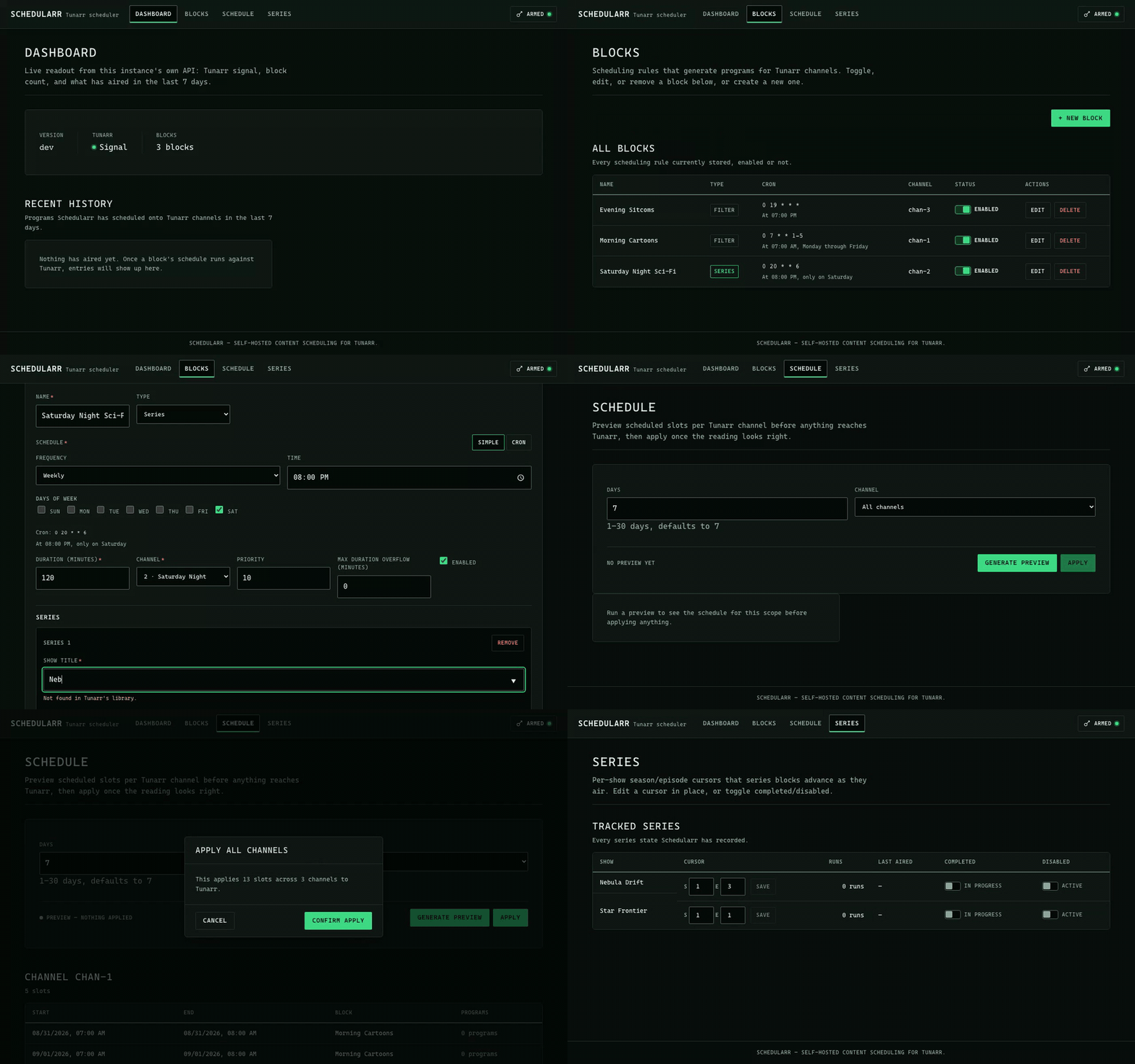
| Web UI | Programme guide with draft & apply, blocks editor, series-state panel |
| Dry run | generate without --apply previews a schedule without pushing it to Tunarr |
| Priority system | Resolves overlapping blocks by configurable priority |
Quickstart
Run against an existing Tunarr instance with a container:
docker run -d --name schedularr \
  -p 8484:8484 \
  -v "$(pwd)/config.yaml:/etc/schedularr/config.yaml:ro" \
  -v schedularr-data:/data \
  -e SCHEDULARR_API_TOKEN="$(openssl rand -hex 32)" \
  ghcr.io/christopherime/schedularr:latest
Open http://<host>:8484/ and paste the token from SCHEDULARR_API_TOKEN into the token panel. See Getting Started for building from source and generating a config file, and Deployment for the full container reference.
Where to go next
- Getting Started — install from source or Docker, generate and validate config
- Web UI Guide — the programme guide and its draft & apply mode, blocks editor, series state, token setup
- Scheduling Concepts — filter vs. series blocks, cron, series cursors, history retention
- CLI Reference — every subcommand and flag
- API Reference — HTTP endpoints, or the live contract at
/openapi.json - Architecture — components, data flow, design patterns
- Metadata Engine — TMDB/TheTVDB providers and the canonical genre vocabulary
- Design System — the web UI's visual system
- Deployment —
docker run, config reference, Helm chart - Roadmap — the feature plan and versioning toward v1.0.0