Web UI Guide¶
A Hugo-built web UI lives in web/ and is embedded into the schedularr binary via go:embed (web/embed.go, package web, web.Site()). schedularr serve mounts it as internal/api.Config.UI and serves it from the router's catch-all NotFound handler: the four system routes (/healthz, /readyz, /metrics, /openapi.json) and /api/v1/* win first, and everything else falls through to the embedded site.
A directory request resolves to that directory's index.html (/ → index.html, /blocks/ → blocks/index.html); the same request without its trailing slash (/blocks) gets a 301 redirect to the slash form, like net/http.FileServer. A path that matches no file serves 404.html with HTTP 404. Non-GET/HEAD requests get a 405.
Every response the UI handler serves carries X-Content-Type-Options: nosniff, Referrer-Policy: same-origin, and a Content-Security-Policy where every directive is 'self'/'none' (the site vendors Alpine.js, no CDN, and only calls its own origin's /api/v1). See Design System for the full CSP rationale and the design tokens behind the UI.
Building the UI¶
Nothing under web/public/ is tracked in git; make web-presence (a prerequisite of make build) writes a one-line placeholder there on demand when it's missing, so go build ./... keeps working without Hugo installed. A release build (the Docker image) always runs the real hugo --minify -s web first and never ships the placeholder.
Prerequisites to build the real UI locally:
- Hugo ≥ 0.120 —
brew install hugo - Node.js with npm — only used to generate and type-check TypeScript; not required to build the Go binary
# One-time: install the npm devDependencies (typescript, openapi-typescript)
npm install --prefix web

# Regenerate TS types from api/openapi.yaml, type-check, then build with Hugo
make web
make web-types (openapi-typescript → web/assets/ts/gen/types.d.ts), make web-check (type-check with tsc --noEmit), and make web-build (the Hugo build) are real prerequisites of each other, in that order, so make -j can't interleave them.
make web-build runs hugo --minify --cleanDestinationDir -s web. The clean flag is load-bearing: Hugo never deletes stale output on its own, so without it a previous dev build's /kit/ page and unminified per-page bundles would linger in web/public/ — and ride into locally built binaries via go:embed all:public. With it, make web always leaves exactly the production site in web/public/.
Hugo's config lives in web/config/ (_default/hugo.toml plus a production/hugo.toml overlay). make web builds the production environment; hugo -s web -e development additionally builds the dev-only /kit/ component gallery — every shared partial in every state, on fixture data — which is the review gate for UI changes and never ships in the binary.
Shared runtime¶
Each page loads exactly one script bundle: a thin page entry (web/assets/ts/pages/*.ts) compiled together with the shared runtime (web/assets/ts/runtime/) — the typed API client (with request timeouts and a double-submit guard on every mutation), token storage, error/formatting helpers, the /channels cache behind the channel pickers and legend plates, the event tape, and the shell wiring (token panel + bezel telemetry).
Unit tests¶
make web-test (also part of make lint, and a CI step) runs the UI logic tests in web/tests/ on Node's built-in test runner — no test framework dependency; Node's native type stripping executes the .test.ts files directly. Page modules import cleanly under Node with small document/window stubs (their top-level side effects — registering an alpine:init listener and the shell init — are inert against them), and the vendored cronstrue UMD bundle is loaded as the same global the browser gets. The suite covers the runtime's error describing, typed path building, channel labeling/plates/ordering, formatting, the guide grid's pure geometry (time→quantum clamping with overnight spills, grid-column mapping, window day counting and week chunking, join-vs-cut segment edges, primary-piece selection, pager range labels, ghost placement, keyboard-nav picking), the blocks page's cron round-trip and spec round-trip, its row readings (the NEXT cell's four states, the dark chip, the priority rank and where it is suppressed) and its power-tool predicates (the rail's state machine and occurrence labels, the series-row summaries, and what raises a mid-run cron confirm), the guide's draft model (the reading-vs-draft diff, the stored-reading codec, the request body, and every line of draft copy), and the draft state machine itself — the page registers its Alpine component on alpine:init, so the harness captures that factory and drives one fresh component per test against a stubbed fetch, observing the render queue, the fetch log, and where focus lands. Add new tests as web/tests/*.test.ts; they are type-checked by tsc --noEmit along with the sources.
Token Setup¶
The UI talks to /api/v1 with the same bearer token schedularr serve was started with (SCHEDULARR_API_TOKEN or api.token — see the Deployment config reference). The token lives only in the browser and — since v0.5.5 — is encrypted at rest: an AES-GCM-256 key (non-extractable, held in IndexedDB) encrypts it, and localStorage's schedularr_api_token_v2 entry holds only the {iv, ciphertext} result, with a fresh IV on every save. A plaintext schedularr_api_token entry left by v0.5.4 or earlier is migrated automatically — encrypted, then deleted — the first time the UI loads. If the browser blocks WebCrypto or IndexedDB (some private-mode lockdowns), the token is kept in memory for the session only and the panel re-opens next visit; it is never written to disk as plaintext. The UX is unchanged: paste once, Save, done. The token is attached to every API request and never embedded in the served HTML/JS; the encryption defends the at-rest copy, while in-page script access remains the CSP's job (see the threat-model note in web/assets/ts/runtime/token.ts).
- Open the UI (
http://<host>:8484/by default). With no token stored, the UI probesGET /api/v1/statusfirst: a401opens the Arm API Token panel automatically, while a deployment running withapi.insecure_no_auth: trueanswers without a token and never sees the panel at all — the panel only ever appears when the API actually demands a token. - Paste the same token the server was started with. The input is masked; click the eye icon to reveal it before saving.
- Save stores the token, probes
GET /api/v1/statuswith it, and flips the header dot to Armed only when that probe succeeds — the dot now means verified, not merely stored. A failed probe keeps the panel open with the error inline. Clear wipes the token (and leaves the panel open). - If any API call comes back
401(wrong or expired token), the dot drops to Unarmed and the panel opens automatically with an inline error — but at most once per unarmed episode: dismiss it, and later 401s (including the 60-second telemetry poll's) only keep the dot and inline error current instead of re-stealing focus every minute. Successfully arming a token starts a fresh episode. Arming also re-fires whichever page loads had failed — no per-section Retry grind — but never repeats a write (create/apply/delete); repeat those yourself.
Bezel telemetry¶
The header carries a persistent telemetry strip on every page, fed by the live link and — when that is unavailable — by a 60-second GET /api/v1/status poll:
- TUNARR — signal dot plus text (Signal / No Signal, or No data while the poll itself can't reach the server).
- LAST APPLY — how long ago the most recent apply pushed a lineup to Tunarr (
Status.last_applied_at), or an em dash before any apply has been recorded. -
NEXT TICK — when
serve's cron loop will next generate and apply (Status.next_cron_tick), or due while an overrunning tick is still mid-run (the loop records the next tick's time before running the current one, so the stored instant can already be in the past). -
LINK — the state of the live link itself, as a coded dot plus text. Colour never carries the state alone.
The LINK legend and its three states¶
The UI holds one Server-Sent Events connection per tab to GET /api/v1/events, so a change one operator makes shows up in every other open tab without anyone pressing reload. The legend says which rung the connection is on, and the rungs degrade what you see, never what you can do:
| State | Means | What still works |
|---|---|---|
| LIVE | The stream is connected and has delivered at least a heartbeat. | Everything, plus other tabs' changes arriving on their own. |
| POLL | Three consecutive connection failures. The stream keeps retrying in the background while the 60-second /status poll takes over. |
Everything. Bezel readings stay current; page content needs a reload. |
| LINK LOST | Six consecutive failures — the network is gone. Polling stops and the legend offers a Reconnect button. | Everything, by reload. |
The reconnect ladder backs off from 1 second to 30 seconds and resumes with Last-Event-ID, so a brief drop replays what it missed rather than starting blank. Polling is suspended while the stream is healthy — the two never run at once.
An honest instrument says it has no reading rather than showing a stale one, which is why LINK LOST stops polling instead of leaving the last value on the glass. Two motion moments mark the transitions and no more: one amber pulse entering LINK LOST, one green on reacquire, both suppressed under prefers-reduced-motion.
No page needs the stream. Every route stays fully operable with a manual refresh when the link is down. If a reverse proxy in front of Schedularr buffers or times out the stream, the UI degrades to POLL and keeps working — see the proxy requirements.
What refetches, and what deliberately does not¶
The stream carries change events, not content. A page decides for itself what to do with one:
- The Guide refetches
GET /scheduleonapply.completedandplan.invalidated, debounced 2 seconds — but only while it is idle in committed mode and the tab is visible. - History prepends to RUNS and refetches AS-RUN on
apply.completed;series.changedrefetches TRACKED. - Blocks refetches the list on
plan.invalidated.
Two guards override all of that. An auto-refetch that discards work in progress is worse than no live link at all:
- The Guide freezes while the inspector is open or a draft is armed. Instead of refetching it pins a
LINEUP CHANGED — REFRESHline, and an armed draft additionally disarms withSOURCE CHANGED — RE-PREVIEW— a draft planned against a source that has since moved stays readable but may not be applied. - Blocks freezes while the editor panel is open, dirty or clean. A clean editor looks harmless, but it is holding the
updated_atits next save will send asIf-Match; refetching underneath it would quietly re-arm that header with a record the operator has never seen, and the next save would then succeed and overwrite the other tab's work. However many changes land while the panel is open, they cost exactly one read when it closes. A change to the open block raises an inline note; it never clobbers what you are typing. The one frame that raises no note is this page's own echo — Duplicate leaves the editor open on the copy it just made, holding the freshest record there is.
The Guide's sweep cursor advances on its own 60-second timer, corrected by the heartbeat's server_time, never on the stream. Every relative timestamp in the UI reads that corrected clock rather than the browser's, which is the permanent fix for the clock-skew class of bug.
A hidden tab drops its stream entirely — it holds a connection open for nobody, and the server holds a subscriber slot for it. On becoming visible it reconnects and each page re-reads its own primary GET, because the hub's resume ring holds only 128 events and a tab that was away a while cannot trust replay to tell it everything it missed.
Event tape¶
Successful writes print onto an inline event tape under the page heading — timestamped uppercase lines, newest first, at most three retained, never a toast and never auto-dismissed. Saving, deleting, toggling, duplicating a block or moving its dark window, toggling a series row, rewinding a cursor, and applying a draft on the Guide all print tape lines. A line may carry one action: saving a block prints BLOCK SAVED — <name> with Preview on guide, which opens the Guide already drafting that block's channel, and a cursor rewind that partly failed carries Open cursors into the History page's TRACKED pane.
Page Tour¶
The Guide (/)¶
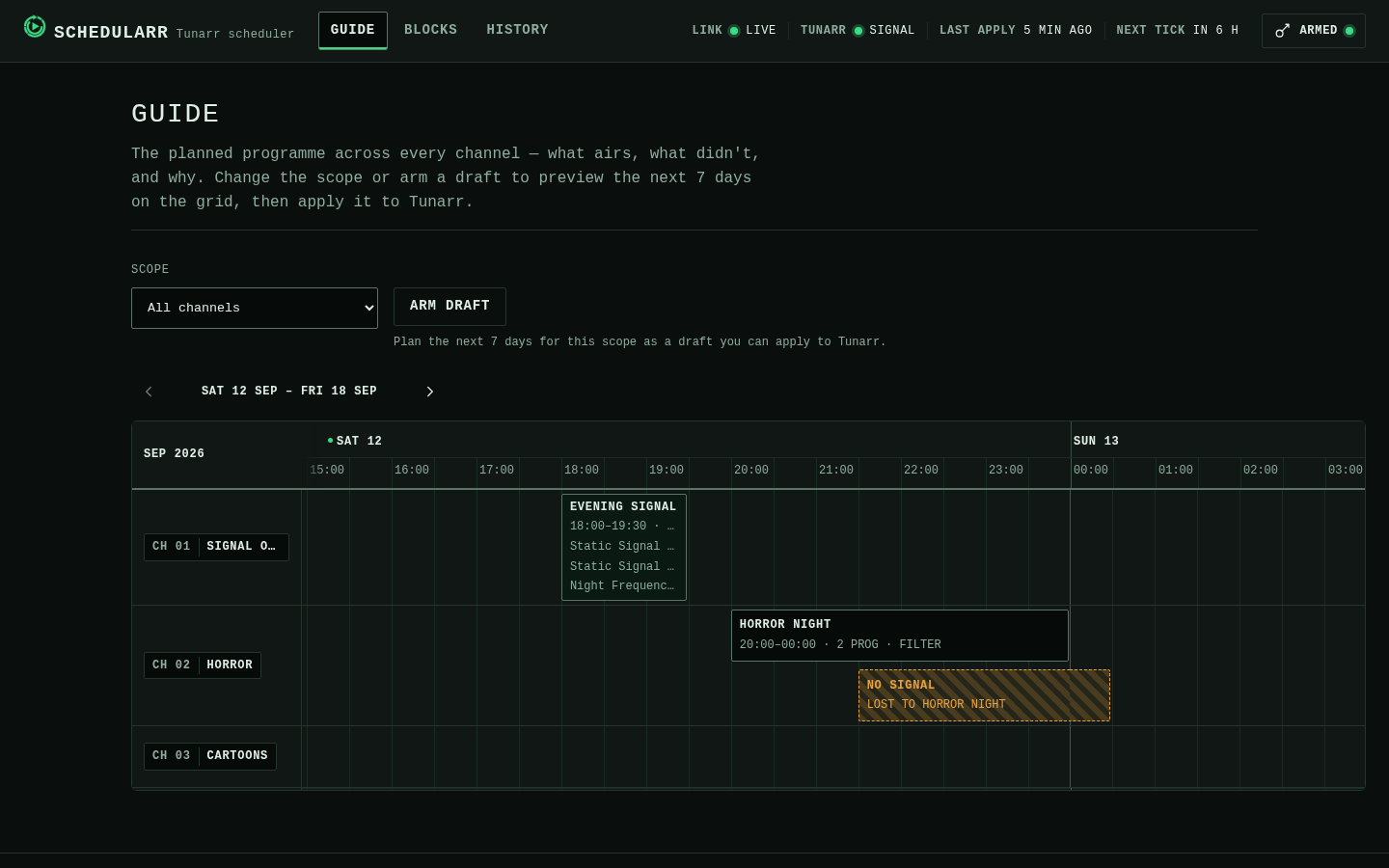
The programme guide as home: channels as week-long tracks under a two-tier day/hour ruler, one graticule division = 30 minutes, the sweep cursor at now, and a hatched NO SIGNAL ghost where a dropped occurrence would have aired.
The home page is a full EPG grid of the current plan, loaded automatically from GET /api/v1/schedule the moment the page opens — no Generate click. The grid renders a full week at a time: channels are rows headed by their legend plates, and each row runs seven consecutive days as one continuous horizontal timeline. A two-tier ruler tops it — sticky day headers (SUN 30 · MON 31 · …, each day's name staying readable while its day pans) over the hour cells, whose 30-minute divisions are the literal graticule, with the month readout in the sticky corner. Day boundaries carry a slightly stronger rule through the tracks. A slot that crosses midnight inside the week reads as one continuous block — its two day pieces render flush, no cut between them — while a slot running off the week's outer edge is cut with a dashed edge and continues on the neighboring week page. The grid scrolls on its own axes (the page body never scrolls sideways) and opens scrolled to the sweep cursor — the accent now-line with its phosphor trail, advancing once per minute, drawn on the week that contains now. Past slots dim behind it; the on-air slot carries the armed glow.
- Toolbar — SCOPE (a channel picker, default all channels) and Arm draft. Neither re-reads the guide: the reading behind the grid is always every channel, and both controls plan a draft against it instead (see Draft & apply; a draft scoped to one channel diffs that channel's row alone). There is no DAYS control: the guide always fetches the whole plannable window (
days=28) in one request and pages it client-side. The first load after a restart re-plans four weeks against a cold Tunarr and can take up to a minute — the loading state says so, and the request runs on a 90-second timeout instead of the usual 15. - Week pager (
‹ SUN 30 AUG – SAT 05 SEP ›) — the only navigation: the chevrons page whole weeks across the loaded four-week window, entirely client-side (never a re-plan), and disable at the window's edges. The label between them names the visible week's calendar range. The window is[fetch time, fetch time + 28×24h), so a load after midnight spills into a trailing partial calendar day — an honest one-day fifth page named by its single date. Today's day header carries a small accent dot. On the week containing now the guide opens scrolled to the sweep cursor; other weeks open at their start. - Slots — block name, time range, program count, and type on the face. A series slot also lists its programs on the face, one line each (
Bloody Mary · S01E05— the show leads the line, not the episode title, since the slot's own heading is the block and a block can interleave several shows; a movie is just its title), folding anything past three lines into+N MORE; slots narrower than 90 minutes keep the compact face. A cross-midnight slot shows its face once, on its wider piece (a 23:30→06:00 slot labels the morning side). Click (or Enter) opens the inspector: a right rail on desktop that compresses the grid (a bottom sheet on mobile) with the block name linking to its editor (/blocks/?edit=<id>), the channel plate, the time range with duration, the full program rundown (per-program start times andSxxEyymarkers from the typed schedule shape), the cron with its plain-language readback, priority with its rank context (50 · 2nd of 5among the channel's enabled blocks, from the same helper the Blocks list's PRI column reads — a bare50for a block that is switched off or currently dark, which is not contending), and enabled state. Series-type slots add a Jump to sequence cursor action linking to the History page's TRACKED pane (the whole list — per-row anchors don't exist yet). Opening moves focus to the panel heading; Esc or the X closes it and returns focus to the slot. - NO SIGNAL ghosts — every conflict warning in the current plan renders as an amber-hatched ghost slot at exactly the time it would have aired, labeled
NO SIGNAL — LOST TO <block>, in a thin lane under the slot that displaced it. Its inspector states the verdict and links both blocks. When a warning can't be placed (the enrichingGET /blockscall failed, or the block is gone), the guide pins an amberN OCCURRENCES DROPPED BY CONFLICTS — PLACEMENT UNAVAILABLEline above the grid instead of letting it vanish. - Keyboard — slots form a roving tab stop: Left/Right walk a channel's track across the whole week (a cross-midnight slot is a single stop), Up/Down jump across channels to the nearest slot by start time, Enter opens the inspector, Esc closes it.
- States — loading is a week-shaped skeleton strip aligned to the divisions, with an honest note that a first load after a restart can take a minute. A failed plan (Tunarr unreachable) is an honest scanline NO SIGNAL blackout with a Retry — the guide re-plans live and never shows a cached lineup. An empty plan teaches: with no blocks at all it points at Blocks; with blocks that simply don't air in the window it says so. A draft that plans nothing gets its own state rather than an error — see below.
- Mobile — under 640px the grid reflows into a vertical rundown:
TONIGHT/TOMORROW/ dated headings, one chronological slot list for the channel chosen in the CHANNEL picker (the one channel control on mobile — the desktop SCOPE select hides, and the grid stays all-channels; Arm draft stays beside it as the on-page draft entry), and the now-line as a horizontal rule between what aired and what's next. The same‹/›week pager pages the rundown — its day sections span the visible week. An overnight slot lists under both days, its second appearance markedcont'd · until 01:00— the rundown's version of the grid's midnight joins. The inspector becomes a bottom sheet, the nav becomes a single scrollable tab row with edge fades, and the bezel telemetry drops its dividers for a compact two-column readout. The bezel itself scrolls away with the page on mobile instead of pinning — wrapped to three rows it would cost a third of a phone screen — so the draft bar pins to the viewport's own top edge there.
Draft & apply¶
Since v0.5.6 the Guide is also the one surface that plans and applies. Three things share the grid:
- The reading is committed mode:
GET /api/v1/schedule?days=28for every channel, loaded when the page opens and re-fetched after every apply. SCOPE never narrows it. - A draft is
POST /api/v1/generatefor the current SCOPE over the next seven days, armed for apply and painted onto the same grid as a diff against the reading. - A verdict is what the draft does to one slot —
NEW,CHANGED,REMOVED, or unchanged.
The honesty boundary. Nothing in the browser knows Tunarr's current lineup, so every verdict and every count reads vs the reading taken at HH:MM, and the copy says so. A slot marked REMOVED is in that reading and not in this draft; it is not a claim about what Tunarr holds now. That question waits for the enriched history of the Memory slice.
Three entry points, all producing the same armed draft:
- SCOPE — choosing a channel (or All channels) drafts that scope at once. It does not re-read the guide.
- Arm draft — the button beside SCOPE. It is the only on-page draft entry on mobile, where SCOPE hides, and the way to re-draft the same scope after a discard.
- PREVIEW ON GUIDE — the action on the Blocks page's save tape line, which opens the Guide already drafting that block's channel.
SCOPE is never disabled: it stays live through a reading load, a preview, and an apply. Disabling the control under the operator's focus would blur it and strand the keyboard on the page body, so a change landing mid-flight is latched instead and fires when that flight lands, against whatever SCOPE holds by then. Arm draft is disabled only while a draft or an apply is in flight; a reading load leaves it pressable, and the press latches the same way. Two failures drop the latch: a reading that never landed, and a failed apply, where re-drafting would clear an error the operator still has to read. Arming with no reading on the glass (a failed first load, or NO SIGNAL) fetches a reading first and latches the press: with no reading behind it, the bar could only date the diff to the epoch. NO SIGNAL's Retry is the recovery.
Why seven days. The reading spans four weeks; the draft and the apply behind it span seven days. The engine prunes occurrence snapshots and schedule history by write time on every commit (maintenance.history_retention, seven days by default), so an apply reaching past that window commits state the store forgets before it airs — the cron loop then re-plans day-of from an already-advanced cursor and skips episodes. Seven days is also what POST /generate and POST /apply plan when the body omits days (see the API reference), the default the design spec confirmed (§11 Q6), and the default of the preview-and-apply page this mode replaces.
The draft bar is sticky under the bezel, above the grid, so Apply and Discard stay reachable at any scroll position — including on mobile, where the long rundown scrolls the page. Its line is the whole readout:
7-DAY DRAFT — 14 SLOTS ACROSS 3 CHANNELS · 2 NEW · 1 CHANGED · 1 REMOVED · 1 DROPPED · VS READING 21:02
The bar omits verdict counts at zero; a draft that changes nothing reads NO CHANGES; DROPPED appears only when the run lost occurrences to conflicts. While the preview is in the air the line reads DRAFTING — PLANNING <scope> AGAINST TUNARR…, and during an apply APPLYING — 14 SLOTS ACROSS 3 CHANNELS….
On the grid. New and changed slots carry a text chip (NEW / CHANGED) and an accent left edge; unchanged slots dim to half, so the diff is the content. Removed slots render in the second lane — the one the NO SIGNAL ghosts use — with a dashed danger edge, a reversed hatch, and the block name struck through, and never the on-air glow, even for the slot airing right now. A reading slot starting past the seven-day horizon renders plain and reads beyond in the inspector: the draft never planned that far, so it is neither a verdict nor a count. Each slot's inspector states its verdict in full — "Draft: removed — airing now in the 21:02 reading, not in this draft; applying cuts it."
A draft that schedules nothing shows the Nothing drafted state rather than an empty grid: applying it pushes an empty lineup to any channel Schedularr last applied in that scope, so the state names that consequence instead of looking like an error.
Discard returns to committed mode, and doubles as the way out of a preview still in the air (it stays live while DRAFTING…, and the guide drops the preview that lands afterwards). The reading it returns to is the one already in the browser, faded back in — except after an apply failure or when the baseline came from the session mirror, where it is re-fetched instead, because a stale reading may not pass as current. SCOPE snaps back to All channels either way.
Apply opens the shared confirm dialog: Apply ALL channels or Apply CH 04 · HORROR, over a body carrying the draft's real counts — This applies 14 slots across 3 channels to Tunarr — 2 new, 1 changed, 1 removed vs the 21:02 reading. For an empty draft it says what an empty apply means: This draft schedules nothing for CH 04 · HORROR. Applying pushes an empty lineup to any channel Schedularr last applied in this scope — 3 slots removed vs the 21:02 reading. Confirming sends the exact body the preview was generated from, never one rebuilt from the controls on screen, so the scope the dialog named is the scope that lands. The dialog stays open, busy, for the whole push.
On success the tape prints APPLIED — 14 SLOTS / 3 CHANNELS, SCOPE snaps back to All channels, focus returns to Arm draft, and the guide re-fetches the reading rather than merging the applied scope into the old one, so nothing on the grid carries two different timestamps. Should that re-read fail, the guide drops the applied-away reading instead of keeping it: it shows NO SIGNAL with a Retry, and nothing can be armed until a reading lands, because a draft diffed against a reading the apply already invalidated would mark the changes it just pushed as new.
Failures. A failed preview renders an inline problem block above the grid with a Retry, and the grid keeps whatever it was showing. A failed apply keeps the draft armed with its error, so the counts behind the failure stay readable, and offers Retry. A client-side timeout gets its own wording, because an aborted push may already have landed in part: Apply timed out — it may have partially landed, offering Re-draft rather than a blind retry of the same request.
Keyboard and mobile. The draft bar sits in the tab order between the toolbar and the week pager, so Discard and Apply follow the controls that armed the draft and come before the grid. Focus moves to Discard when the press that started a draft came from a control the draft is about to take away — Arm draft, which disables itself, or a Retry inside a problem block, which the new draft clears — because a browser blurs an element it disables and the keyboard would otherwise sit on the page body for the whole flight. The guide's status line announces each draft state to a screen reader. Mobile carries the same bar over the vertical rundown; a removed row is marked there by a danger stroke down its left edge, plus the same hatch and strikethrough.
Arriving from a block save. PREVIEW ON GUIDE lands on /?draft=<channel|all>, and the guide drops the parameter from the URL on arrival, so a refresh is a plain guide load. The guide mirrors every reading it loads into sessionStorage (per tab), and that mirror is the diff baseline for this round trip — a block save doesn't cost a fresh 28-day re-plan. The guide ignores a mirror older than 24 hours, or older than the server's own last apply (Status.last_applied_at, read on arrival). It stays a baseline and nothing more: the guide never paints it as the current reading, the loading skeleton holds the frame until the first draft lands, and any exit from draft mode re-fetches.
Where the retired preview page's three views went. Its per-channel window list is the grid itself, slot by slot, with the inspector's rundown for the programs inside one slot; the same list for windows that have already aired is the History page's AS-RUN pane. Its DAYS control is gone by spec — the guide reads four weeks and drafts seven days. Its warnings list is the ghost lane, each dropped occurrence drawn at the time it would have aired, with the amber drop legend above the grid for the ones that can't be placed.
Blocks (/blocks/)¶
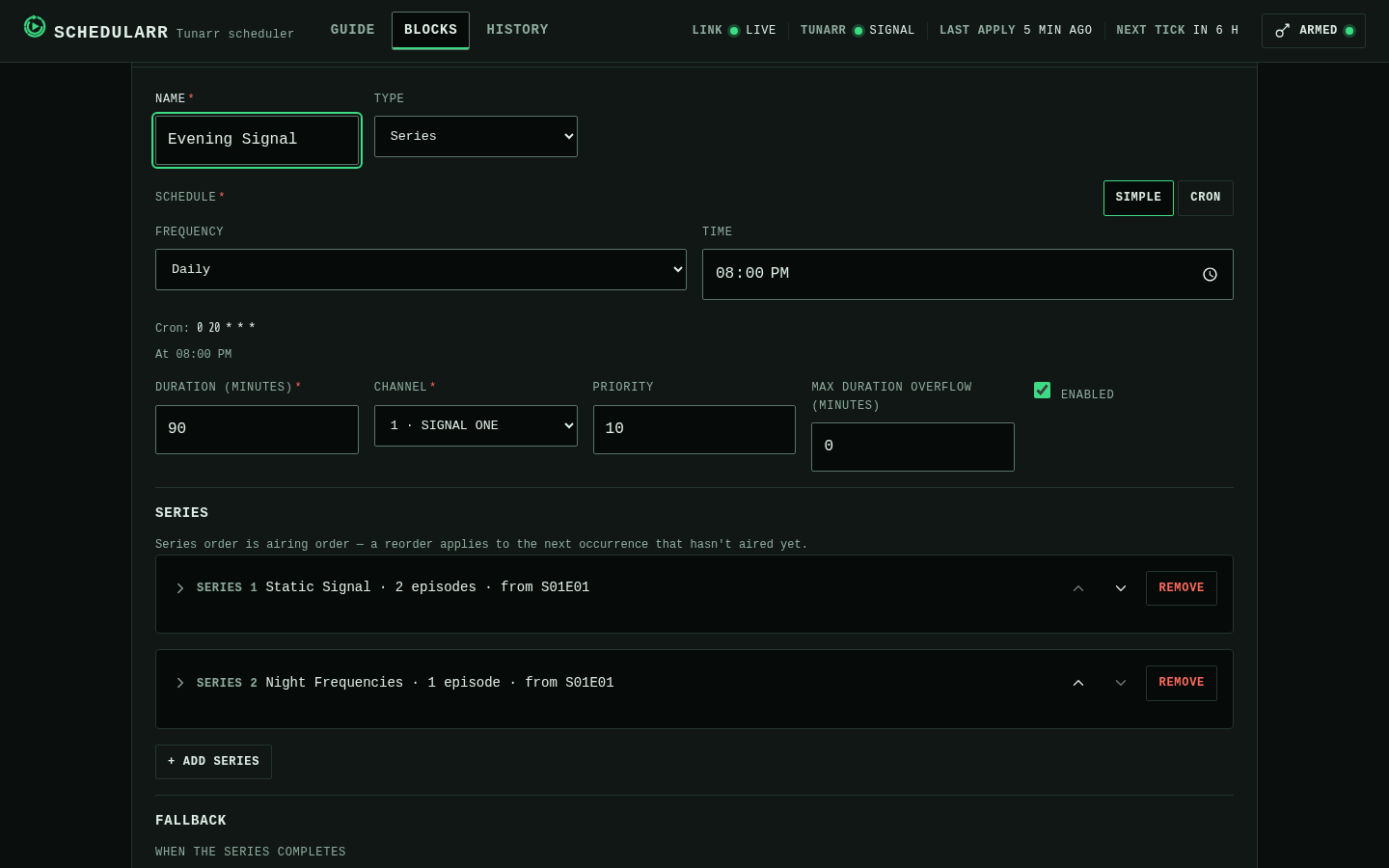
The inline editor, open on a series-type block with two show rows expanded.
List every stored block and create/edit/delete them, backed by GET/POST/PUT/PATCH/DELETE /api/v1/blocks[/{id}], with POST /blocks/{id}/duplicate behind the row's copy action and GET /cron/next behind every instant the page prints. One page, no routing between list and editor: a + New Block button on the list's header line and each row's Edit open an inline panel above the list, which auto-scrolls into view and focuses the name field when it opens.
List — seven columns: Name; Type (a filter/series badge); Schedule (the raw cron, its duration beside it, and a plain-language readback underneath — cronstrue, see Design System); Next; Channel · Priority (the channel's legend plate with the priority line under it); Status (the Enabled/Disabled toggle with the DARK UNTIL chip under it); and Actions (Edit, Duplicate, Go dark — reading Bring back on a block that is already dark — and Delete). Load and action failures share one inline problem panel above the list, with Reload blocks as the recovery. Delete opens the shared native <dialog> confirmation naming the block before anything is sent — the same confirm idiom the Guide's Apply uses. The three power-tool dialogs below are separate elements built on that same idiom, because the shared partial can only be instantiated once per page.
NEXT: when the block actually airs¶
NEXT is the next instant the block airs, which is a different question from the next tick of its cron. The server computes it (BlockRecord.next_occurrence) through the same parser the scheduling engine plans with, and it honours both dark switches: a block sitting dark reports the first occurrence at or after it wakes, never a tick the planner is going to skip. The cell reads as a countdown over the absolute local instant, and an occurrence already under way reads due rather than "12 min ago" — a past reading on a fresh row looks like a missed airing. The countdown re-renders once a minute against the server's clock; the instant behind it moves when the list re-reads.
There is no instant in three different situations, and the cell says which, because that decides whether it is yours to fix:
| Reading | Why there is no instant | The step out |
|---|---|---|
DISABLED |
The enabled switch is off, so the block is not scheduled at all. | Enable the block. |
CRON UNREADABLE |
The stored expression does not parse. | Fix the expression. |
NEVER FIRES |
The expression is valid and no date matches it — 0 0 30 2 * is February 30th. |
Fix the expression. |
A block that is disabled and broken reads DISABLED: switching it on is the step that comes first, and the Status column beside it already says as much.
CRON UNREADABLE is rarer since v0.5.10: POST /blocks, PUT /blocks/{id} and POST /blocks/import now reject an unparseable expression with a 400, where before they took it and the engine failed on it much later, as a 502 at apply time, in a place that could not point at the field that caused it. Two ways such a row still exists — it predates that check, or it came in through the first-run scheduler.yaml bootstrap, which validates against the CUE schema and that types cron as a bare string. Either way, the write path refuses that block until its cron parses: the row cannot be saved at all, whatever else you opened it to change.
Two dark switches, two meanings¶
The Enabled/Disabled toggle and a dark window are independent axes, and a block is planned only when both are clear. The toggle is the indefinite one — nothing but an operator turns it back on. A dark window is the timed one: it expires by itself at the instant it names, and "until" names the moment the block returns, so a window ending at 06:00 lets a 06:00 occurrence air. Setting either never writes the other, which is why the DARK UNTIL chip sits under the toggle instead of replacing it: a block can be enabled and dark at once, and hiding the switch would hide the control that ends a dark window for good.
The chip paints only while the wake-up is still in the future. A window whose instant has passed suppresses nothing, so a chip there would report a state the server no longer holds.
A dark window is operational state rather than part of the block's spec, and it does not round-trip through scheduler.yaml — see Scheduling concepts.
PRI: a rank only while the block is contending¶
PRI 50 · 2nd of 5 ranks the block against the enabled blocks on the same channel — the same computation the Guide's inspector prints, from one shared helper, so the two surfaces cannot disagree about a rank. A block that is switched off or currently dark shows a bare PRI 50. It is not contending right now, and a placing beside it would announce a contest it has no part in. A dark peer still counts in the field, because it is defined and it comes back. The bare number also stands when there is no field to rank against: the block list failed to load, or every peer on the channel is disabled.
Duplicate¶
Duplicate copies in one click, with no dialog on the way — the name is pre-filled Copy of <name> and sent. The copy carries the whole spec, filters, filler and series rows with their seed positions included, and gets a fresh id and fresh timestamps. Nothing keyed to the source comes with it: series cursors and occurrence snapshots record what the source has aired, and a copy has aired nothing.
The copy arrives disabled, and opens in the editor. An exact copy shares its source's cron, channel and priority, so landing it enabled would put two blocks in one slot on one channel and conflict resolution would silently drop one of them; it is a draft to edit and then switch on. The editor opens against the record the server actually created, so the If-Match its first save sends is the copy's own.
The naming dialog appears only when the name is taken. The 409 comes back carrying the server's own reason, with the field selected so the next attempt is one retype; nothing appends a counter, because you are the one who can see what the other block is. The tape prints COPY CREATED, DISABLED — <name>.
Go dark, and bring back¶
Go dark opens a picker of three presets — Tomorrow, Next week, In four weeks — each printing the instant it commits to (local midnight, that many days on), because "next week" is not a choice until you can see which day it lands on. Choosing one sends a PATCH carrying disabled_until and nothing else; the enabled switch is untouched, and the tape prints DARK UNTIL <instant> — <name>.
On a block that is already dark the same control reads Bring back and performs the write itself — one PATCH clearing the window, no dialog, BACK ON SCHEDULE — <name> on the tape. A dialog is where a wake-up is chosen, and ending one has nothing to choose. A block that needs a different wake-up comes back and goes dark again.
Both power tools go unavailable while another row action is in flight or the editor panel is open. There is one pending slot for the whole list, so a second write armed over the first is dropped by its own guard after you have already clicked; and both actions write into the list the open editor reads its If-Match from, which is the lost update the editor freeze exists to prevent, arriving through a row action rather than a live-link frame.
Editor — common fields: name, schedule (see "Schedule picker" below), duration (minutes), channel, priority, max duration overflow (minutes), and enabled. Name, schedule, duration, and channel are marked required with a static * next to the label. channel_id is a <select> populated from GET /api/v1/channels when Tunarr answers with at least one channel; while the list is still loading it shows an explicit disabled "Loading channels…" select, and it falls back to a free-text input (with an inline reason) when the call fails or returns nothing.
Schedule picker¶
A Simple/Cron mode toggle on the schedule field:
- Simple mode is a frequency select (daily / weekdays / weekly / monthly / custom days), day-of-week checkboxes (weekly/custom only), and a native
<input type="time">, which together generate the 5-field cron string live as the operator adjusts them. - Cron mode is the raw text field, with a permanent format caption (
min hour day-of-month month day-of-week (* = any)) underneath it.
Switching from Cron to Simple mode parses the current cron string back into the picker's fields when the pattern is one Simple mode can represent (a plain fixed time, optionally restricted to specific weekdays or a single day-of-month); anything else — a day-of-month combined with a weekday restriction, a month restriction, a list/range/step on minute or hour — locks the field to Cron mode with an inline note rather than rendering a lossy guess.
A plain-language readback (cronstrue, vendored) renders live under the field in both modes, understanding any valid 5-field expression. Storage is unaffected either way: the cron string is still the one value submitted, whichever mode produced it.
Type-specific fields and autocomplete¶
filter shows genres/ratings/title-pattern(regex)/year range/duration range/tags (comma-separated inputs map to arrays; an empty input omits the field, it is never sent as []). Genres and ratings are <input list=...> fields backed by a <datalist> populated from GET /api/v1/media/meta, fetched once per editor open; free text is always accepted regardless.
series shows repeating rows (show title, episodes per block, start season/episode, on-complete, skip-episodes, max runs — add/remove freely, each opening collapsed to a summary line, see Collapsed series rows) plus a fallback section (redistribute/filler, with a nested filter subset when filler is chosen). Show title is the same <input list=...> pattern, backed by GET /api/v1/media/shows: an amber, non-blocking note ("Not found in Tunarr's library.") appears under a row whose typed title doesn't case-insensitively match any loaded show, as long as the media fetch itself succeeded — a failed fetch degrades silently to plain free text, with no datalist and no warning. Each row's array position is the airing order (see Scheduling concepts); up/down buttons on each row reorder in place, disabled at the first row's up and the last row's down, and a note above the list states that a reorder applies from the next not-yet-aired occurrence.
A Filler section (enabled, filler list ID, max filler time, min gap time) is available for either type. Every section maps 1:1 onto BlockSpec — the submitted JSON only ever contains fields the operator actually filled in, plus type and enabled (always explicit).
Validation — skip_episodes is checked client-side against SxxExx (e.g. S01E05) before submit, with the exact invalid token(s) named inline; everything else is left to the API. A 400 renders its title/detail inline near the submit button; a 409 (duplicate name) renders under the name field specifically.
What this will do¶
A rail sits under the form, directly above Save, and answers what the edit will cause while it is still an edit. Three groups:
- Next three — the next three occurrences, each with the end time the block's own duration puts on it. The starts come from
GET /api/v1/cron/next: the client never evaluates cron, and the readback higher up the form is cronstrue rendering prose about the expression, not dates. The end prints as a bare clock while it lands on the start's own local day and as a full instant when it crosses midnight, so a 23:30 block never reads as ending before it starts. A duration not typed yet leaves the start standing alone rather than inventing a range from an unknown length. - On this channel — the enabled blocks contending for that channel, highest priority first, with this one marked (this block) and carried at the values in the form rather than the ones stored. Changing the priority is exactly the edit whose consequence this group shows. A block with no channel chosen yet gets a prompt instead: "nothing else contends" is a different claim from "you have not said where this goes".
- Lineup (series blocks) — the show rows in their current order, which is the airing order, so a reorder above shows up here as the reorder it will cause.
The occurrences re-read half a second after you stop changing the schedule, from whichever control changed it — the raw cron field and every control in the Simple-mode picker alike. Because the instants are the server's, an expression the server refuses shows the server's own complaint inline rather than an empty rail, and one it accepts that never comes round says No date matches this cron. — the same sentence the list's NEXT column gives that block.
Collapsed series rows¶
A series block seeding a dozen shows makes the editor unreadable, so each show row opens collapsed, as one summary line: Bloody Mary · 2 episodes · from S01E05. Clicking the line expands the row; a row you have just added opens expanded, since an empty row's summary is only the instruction to fill it in. Reordering carries the open state along with the row it belongs to, and a row that fails validation on save is expanded before its error is shown — an inline error inside a collapsed row is an error nobody can read.
An incomplete row summarises what it is missing (Untitled — add a show title, Breaking Bad — add an episode count), so collapsing a dozen rows cannot hide the one that will be refused on save. The title leads whenever there is one: that points at a row, where "row 3 is incomplete" makes you open all twelve.
Changing the cron of a series block that has already aired¶
A series block's cron is not only when it airs — it is how often each show's cursor advances, so a different expression changes which episode lands on which date. The engine applies a row's start season/episode only while that show has never aired; after that the stored cursor alone decides what plays. Saving a changed cron on such a block therefore raises a Mid-run change confirm before the write.
The confirm names the block, counts the shows the change re-aligns, and reads each one out both ways — where its cursor stands now, and where a rewind would send it (the block's own start position, S01E01 unless the row says otherwise). Three buttons: Cancel returns to the editor, Save schedule saves and leaves every cursor where it is, Save and rewind saves and then puts them back.
It fires only for a series block being edited, whose cron actually changed, and at least one of whose shows has aired at least once. A filter block never raises it, a newly created block has nothing that aired under an older expression, and re-saving the same cron with a different duration changes no episode order to warn about.
The rewind is per show. PATCH /state/series/{show_title} writes one title, so a block seeding three shows is three independent writes, and the tape reports them by title: CURSORS REWOUND — Breaking Bad, Firefly for the ones that moved, CURSOR UNCHANGED — Firefly: <the server's reason> for the ones that did not, the second carrying an Open cursors action into the History page's TRACKED pane, where a cursor is fixed by hand. One failing says nothing about the other two. Cursors move only once the block itself has saved — a rewind for a save that then hit a 409 would repair a change nobody made — and the answer is tied to the expression it was given about: put the old cron back after a failed save and the queued rewind no longer applies.
After a save the tape prints BLOCK SAVED — <name> with a Preview on guide action: it opens the Guide drafting that block's channel (all channels when the block carries none), so the next question after "is this block right?" — what it does to the week — is one click away. See Draft & apply.
History (/history/)¶
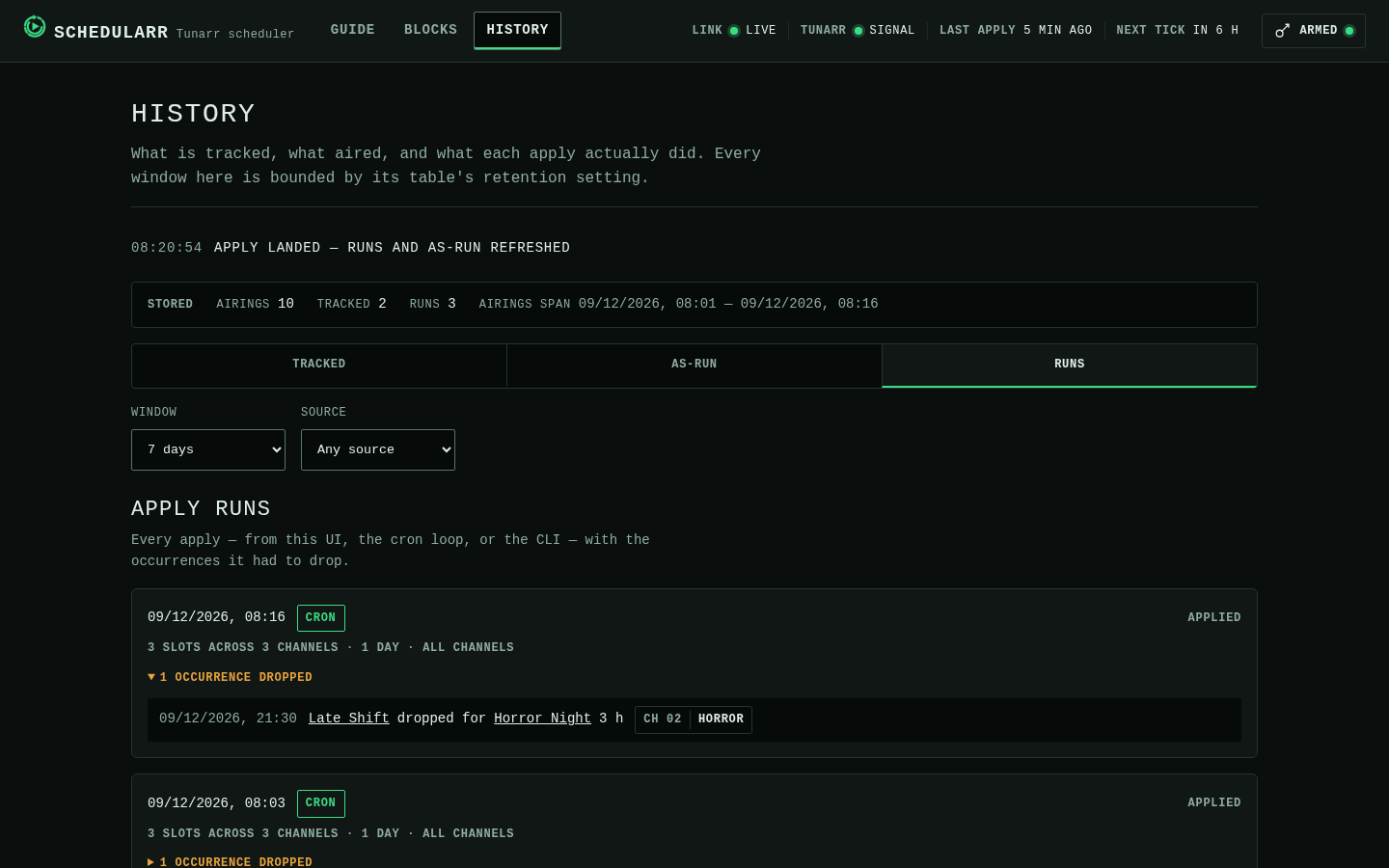
The RUNS pane: one card per apply, with the occurrences conflict resolution had to drop expanded inline.
One searchable record of what is tracked, what aired, and what each apply actually did. It replaced the old /series/ and /dashboard/ routes, which were deleted outright — there are no redirects, and a bookmark to either lands on the styled 404 page.
Three panes sit behind a band selector, and the open pane is the ?view= query value (tracked, asrun, runs), so a link names what it opens — /history/?view=asrun goes straight to the airings. An unknown or missing value opens TRACKED. The band is a proper tab list: arrow keys move between panes, Home and End jump to the ends.
The filter bar above the panes shows only the controls the visible pane honors. Window (1/7/30/90 days) is a server-side query on the AS-RUN and RUNS feeds, so changing it refetches; everything else filters what is already loaded.
TRACKED¶
Every persisted series_state row — the per-show season/episode cursor a sequence block advances as it airs — backed by GET/PATCH /api/v1/state/series[/{show_title}]. There is no create endpoint: a row exists only once a sequence block airs that show for the first time, so an empty result renders an explanatory empty state.
List — show title, an inline SxxEyy cursor editor, run count, last aired (local time, or an em dash for a show that hasn't aired yet), and a Completed/In Progress toggle plus a Disabled/Active toggle. The toolbar's search narrows by title.
Cursor editing — season and episode are two adjacent number inputs (min="1") framed by S/E prefixes, independently editable inline in the same cell. Save stays disabled until the row is actually dirty and, on click, sends a true partial PATCH: only current_season and/or current_episode land in the body, and only when their parsed value actually differs from what was loaded. A season/episode value that isn't a whole number >= 1 is rejected client-side with an inline message. Each toggle is its own single-field PATCH ({"completed": true} or {"disabled": true} alone).
Row vanishes mid-edit — a save against a show_title whose series_state row was deleted or reset out from under the operator returns 404. The row stays on screen with an inline error and a Refresh list action next to the show title, rather than a row that silently can never save again.
The storage strip¶
Above the panes, a single line of what is actually stored: airings, tracked shows, apply runs, and the span the stored airings cover. It reports rows, not policy — retention says what should age out, and a database whose retention was widened holds whatever it holds.
Empty slots appear in the strip once any exist. An occurrence that lost every airing keeps a marker saying it was committed and aired nothing, so a later apply does not re-plan a slot that already went out. Markers cannot be deleted by range, which is why they are counted apart from airings — folded together, the airing count could never reach zero.
Removing a show¶
Each TRACKED row carries a Remove action. It deletes the show's cursor, its airings, and its keys inside every occurrence snapshot, in one transaction. Pressing it runs a dry run first and opens a confirm naming the real counts. Nothing brings the data back.
A row whose show is still listed by a block shows the block names instead of the button, each linking to its editor, with "Remove it there first." The removal genuinely refuses in that state — the next apply would re-add the show from the block spec and reset the cursor the removal just deleted — so the page says so before the click rather than after.
AS-RUN¶
What actually aired, from GET /api/v1/history?days=N, grouped by local day with the newest day first and each day's entries in air order. A row carries the local time, the channel legend plate, the program title, the block that scheduled it, and its duration — program names, not the UUIDs the old dashboard table showed. Channel, block, and title filters narrow the loaded window.
The window is bounded by maintenance.history_retention, so a 90-day view can legitimately come back with seven days of rows. The empty state says so rather than implying the store lost something.
Delete a range sits collapsed inside this pane, because these are the rows it deletes. Opened, it takes a From and a To — prefilled from the strip's stored span — and inherits whatever channel and block filters the pane already has, so the preview counts the list being looked at. Preview deletion runs the dry run and opens the same confirm.
A range deletes airings only. Cursors and snapshots stay, because a date range is not a statement about any particular show — use the TRACKED row action for that. A range covering an occurrence that is on air right now is refused, naming when it becomes safe: deleting the record of what is playing is the one deletion that changes what a viewer sees.
RUNS¶
Every apply — from this UI, the serve cron loop, or schedularr generate --apply — from GET /api/v1/applies?days=N. Each run is a card: timestamp, a source badge (UI/CRON/CLI), the outcome, and a summary line reading counts first (18 SLOTS ACROSS 3 CHANNELS · 7 DAYS · ALL CHANNELS). The Source filter narrows to one origin.
A run that dropped occurrences carries them in an expandable list, each naming the block that lost its slot, the block it lost to, when it would have aired, on which channel, and for how long — which is what makes "why didn't X air last Tuesday" a filter rather than a dead end.
Reading an unfinished run. The row is written before the apply pushes anything to Tunarr and finalized afterwards, so a card still reading In flight long after its timestamp means the process died mid-apply — its finish stamp will never arrive. A Failed card carries the error detail. Neither shows slot or channel counts, because those never landed; both report only the window and scope the apply attempted.
Runs are never backfilled. Nothing exists from before the migration that created the table, and the empty state says so.
Printing¶
Every page carries a print stylesheet: the light palette always (the dark palette is screen-only — a printout is the instrument's calibration sheet on paper), and everything that exists to be clicked comes off the sheet — nav, telemetry, the token trigger, filters, pagers, tabs, action buttons and the deletion desk — leaving the readings. Tables drop their actions column, rows and run cards never split across pages, and wide tables clip at the sheet edge rather than spilling onto a second horizontal page. The Guide prints the sheet it was showing, clipped to the page; the History page prints as a station log.
See also¶
- Scheduling Concepts for what a filter/series block actually configures.
- API Reference for every endpoint the UI calls.
- Design System for the visual system and vendored dependencies.